Deutsche |
Français |
2D platformer game example code
|
|
Show Index |
|---|
This page demonstrates a very simple 2D platformer style game. Some of its features include:
| -a character that can run at varying speeds and
jump variable heights -player character is motivated by input 'forces' and so moves fluently -loads and uses a tile set to draw the background imagery -screen automatically moves with the player -horizontally and vertically scrolling backgrounds/levels -loads and switches between multiple levels -demonstrates how player can interact with background -stats displayed onscreen for programmers benefit |
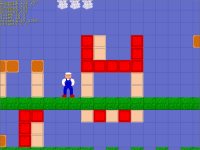 |
Jump ahead to see the final result...
Click here to see an improved version with more features...
Start with setting up the graphics:
Graphics 640, 480						;2D graphics at a resolution of 640x480
SetBuffer BackBuffer()						;do all drawing to the back drawing buffer
Load up the media that the game will use:
Global tileImages						;Stores handle to image of background tiles
Global imgPlayer						;Stores handle to players image

;Load in all graphics, sounds, etc.				;Only loading graphics in this example
Global maxTile = 6						;Define highest used tile for error catching
tileImages = LoadAnimImage("bgtiles.png", 40, 40, 0, 8)
imgPlayer = LoadImage("jumpman.png")
Dimension the arrays and create the globals that you will need:
Dim Level(0, 0)							;Declare grid that will store the level data (defined later)
Dim LevelExit(0, 0)						;Declare array to store exit locations in the level (defined later)

Global LevelWidth						;Stores current levels width (in tiles)
Global LevelHeight						;Stores current levels height (in tiles)
Global NumExits							;Stores the number of exits in the level
Global ScreenX							;Stores the screens current x position
Global ScreenY							;Stores the screens current y position
Global MaxScreenX						;Stores the screens maximum x position
Global MaxScreenY						;Stores the screens maximum y position
Global PlayerX#							;Stores the players current x position on the screen
Global PlayerY#							;Stores the players current y posiiton on the screen
Global CurLevel	= 1						;Stores the current level the player is on
Global GameOver = False						;Stores state of the game (0=playing, 1=lost, 2=win)
Global XVel# = 0						;Players horizontal velocity
Global YVel# = 0						;Players vertical velocity
Load in the level. In larger games we would usually load in the level data from an external file, but for simplicity, here we will just load in our levels from Data statements. We use a function to load the level so that we can reuse it many times. The function itself and all of the Data statements should be at the end of your program though.
LoadLevel(CurLevel, 1, 8)					;Load in the first level; Set players starting position

Function LoadLevel(lvl, startX, startY)
	Select lvl
		Case 1
			Restore Data_Level1			;Set data pointer to level 1
		Case 2
			Restore Data_Level2			;Set data pointer to level 2
		Case 3
			Restore Data_Level3			;Set data pointer to level 3
		Default
			RuntimeError("Error: Level " + lvl + " doesn't exist!")
	End Select
	;Read in the level width and height
	Read LevelWidth						;Width of level in tiles
	Read LevelHeight					;Height of level in tiles
	If LevelWidth > 999 Or LevelWidth < 1 Then RuntimeError("Error: Level " + lvl + " data is corrupt!")
	If LevelHeight > 999 Or LevelHeight < 1 Then RuntimeError("Error: Level " + lvl + " data is corrupt!")
	Dim Level(LevelWidth-1, LevelHeight-1)			;Dimension grid that describes the game level at this time
	;Verify the players starting tile
	If startX >= LevelWidth Or startX < 0 Then RuntimeError("Error: Level " + lvl + " data is corrupt!")
	If startY >= LevelHeight Or startY < 1 Then RuntimeError("Error: Level " + lvl + " data is corrupt!")
	;Compute initial starting positions
	If startX < 5						;If player is near left edge of level then
		ScreenX = 0					; set the screen all the way left and
		PlayerX = startX * 40 + 20			; set players x starting pos
	ElseIf  startX > LevelWidth - 12			;If player is near right edge of level then
		ScreenX = LevelWidth * 40 - 640			; set the screen all the way right, minus screen width and
		PlayerX = startX * 40 - ScreenX + 20		; set players x starting pos minus screen pos
	Else							;If player isn't near left/right edges of level then
		ScreenX = startX * 40 - 200			; set the screen 5 tiles to the left of player and
		PlayerX = 220					; set the players x starting position at 220
	EndIf
	If startY < 4						;If player is near top edge of the level then
		ScreenY = 0					; set the screen at the top and
		PlayerY = (startY + 1) * 40			; set players y starting pos
	ElseIf startY > LevelHeight - 9				;If player is near the bottom edge of the level then
		ScreenY = LevelHeight * 40 - 480		; set the screen all the way down, minus screen height and
		PlayerY = (startY + 1) * 40 - ScreenY		; set players y starting position minus screen pos
	Else							;If player isn't near top/bottom edges of level then
		ScreenY = (startY + 1) * 40 - 160		; set the screen 4 tiles above the player and
		PlayerY = 160					; set the players y starting position at 160
	EndIf
	MaxScreenX = 40 * LevelWidth - 640 - 1			;Set the screens maximum x position
	MaxScreenY = 40 * LevelHeight - 480			;Set the screens maximum y position
	;Read in the screen clearing color
	Read clscol
	If clscol = 1
		ClsColor 100, 110, 200				;Set cls color to sky color
	Else
		ClsColor 0, 0, 0				;Set cls color to black
	EndIf
	;Read in exit data
	Read NumExits						;Read in number of exits in the level
	If NumExits > 10 Or NumExits < 1 Then RuntimeError("Error: Level " + lvl + " data is corrupt!")
	Dim LevelExit(NumExits, 4)				;Dimension LevelExit array at this time
	For iter = 1 To NumExits				;Iterate through the exits
		Read LevelExit(iter, 0)				;Read the exits x position
		Read LevelExit(iter, 1)				;Read the exits y position
		Read LevelExit(iter, 2)				;Read which level the exit links to
		Read LevelExit(iter, 3)				;Read new x pos on new level
		Read LevelExit(iter, 4)				;Read new y pos on new level
	Next
	;Read in level data
	For yIter = 0 To LevelHeight-1				;Loop from top to bottom
		For xIter = 0 To LevelWidth-1			;Loop from left to right
			Read Level(xIter, yIter)		;Read in tile data for each xIter, yIter location
			If Level(xIter, yIter) > maxTile Or Level(xIter, yIter) < 0 Then RuntimeError("Error: Level " + lvl + " data is corrupt!")
		Next
	Next
	;Reset some game variables
	XVel = 0						;Reset players velocitys or he'll keep on moving
	YVel = 0						; when entering into the next level
End Function

;Tile descriptions
;0 blank		;passable tile
;1 sky			;passable tile
;2 cloud		;passable tile
;3 background object	;passable tile
;4 solid block		;nonpassable tile
;5 soft block		;nonpassable tile
;6 grass		;nonpassable tile

.Data_Level1
;Level 1 description
Data 80, 12		;Level width, height
Data 1			;cls color = sky
Data 2			;number of exits in this level
Data 76, 10, 2, 56, 8	;exit location x, y; level number; start location x, y
Data 36, 9, 3, 1, 2	;exit location x, y; level number; start location x, y
Data 1,1,1,1,1,1,1,1,1,1,1,1,1,1,1,1,1,1,1,1,1,1,1,1,1,1,1,1,1,1,1,1,1,1,1,1,1,1,1,1,1,1,1,1,1,1,1,1,1,1,1,1,1,1,1,1,1,1,1,1,1,1,1,1,1,1,1,1,1,1,1,1,1,1,1,1,1,1,1,1
Data 1,3,1,1,1,3,1,3,3,1,1,1,1,2,1,1,1,1,1,1,1,1,1,1,1,1,1,1,1,1,1,1,1,1,1,1,1,1,1,2,2,1,1,1,1,1,1,1,1,1,1,1,1,1,1,1,1,1,1,1,1,1,1,1,1,1,1,1,1,1,1,1,1,1,1,1,1,2,1,1
Data 1,3,1,1,1,3,1,3,1,3,1,1,2,2,2,1,1,1,1,1,1,1,1,1,1,1,1,1,1,1,1,2,1,1,1,1,1,1,2,2,2,2,1,1,1,1,1,1,1,1,1,1,1,1,1,1,1,1,1,1,1,1,1,1,1,1,1,1,1,1,1,1,1,1,1,1,2,2,2,1
Data 1,3,1,3,1,3,1,3,3,1,1,1,1,1,1,1,1,1,1,1,1,1,1,1,1,1,1,1,1,1,2,2,2,1,1,1,1,1,1,1,1,1,1,1,1,1,1,1,1,1,1,1,1,1,1,1,5,5,5,1,1,1,1,1,1,1,1,1,1,1,1,1,1,1,1,1,1,1,1,1
Data 1,3,3,3,3,3,1,3,1,3,1,1,1,1,1,1,1,1,1,1,1,1,1,1,1,1,1,1,1,1,1,1,1,1,1,1,1,1,1,1,1,1,1,1,1,1,1,1,1,1,1,1,1,1,1,1,1,1,1,1,5,1,1,5,5,5,1,1,1,1,1,1,1,1,1,1,1,1,1,1
Data 1,1,3,1,3,1,1,3,1,3,1,1,1,1,1,1,1,1,1,5,1,1,1,1,1,1,1,1,1,1,1,1,1,1,1,1,1,1,1,1,1,1,1,1,1,1,5,5,5,1,5,5,5,1,1,1,1,1,1,1,1,1,1,1,1,1,1,1,1,1,1,1,1,1,1,1,1,1,1,1
Data 1,1,1,1,1,1,1,1,1,1,1,1,1,1,1,1,1,1,1,1,1,1,1,1,1,1,1,1,1,1,1,1,1,1,1,1,1,1,1,1,1,1,1,1,1,1,1,1,1,1,1,1,1,1,1,1,1,1,1,1,1,1,1,1,1,1,1,1,1,1,1,1,1,1,1,1,3,1,1,1
Data 1,1,1,1,1,1,1,1,1,1,1,1,1,1,1,1,1,1,1,1,1,1,1,1,1,1,4,1,1,1,1,1,1,1,1,1,1,1,1,1,1,1,1,1,1,1,1,1,1,1,1,1,1,1,1,1,1,1,1,1,1,1,1,1,1,1,1,1,1,1,1,1,1,1,1,3,3,3,1,1
Data 1,1,1,1,1,1,1,1,1,1,1,1,1,1,1,1,5,1,1,5,1,1,5,1,1,1,4,1,1,1,1,1,1,1,1,5,2,5,1,1,1,1,1,4,1,1,1,1,1,1,1,1,1,1,1,1,1,1,1,1,1,1,1,1,1,1,1,1,1,1,1,1,1,1,3,3,3,3,3,1
Data 1,5,1,1,1,1,1,1,1,1,1,1,1,1,1,1,1,1,1,1,1,1,1,1,1,1,4,1,1,1,1,1,1,1,1,5,2,5,1,1,1,1,5,4,5,1,1,1,1,1,1,1,1,1,1,1,1,1,1,1,1,1,1,5,1,1,1,1,1,1,1,1,1,1,3,3,1,3,3,1
Data 1,1,1,1,1,1,1,1,1,1,1,1,1,1,1,1,1,1,1,1,1,1,1,1,1,1,4,1,1,1,1,1,1,1,1,5,5,5,1,1,1,4,5,4,5,4,1,1,1,1,1,1,1,1,1,1,1,1,1,1,1,1,1,5,5,1,1,1,1,1,1,1,1,1,3,3,1,3,3,1
Data 6,6,6,6,6,6,6,6,6,6,6,6,6,6,6,6,6,6,6,6,6,6,6,6,6,6,6,6,6,6,6,6,6,6,6,6,6,6,6,6,6,6,6,6,6,6,6,6,6,6,6,6,6,6,6,6,6,6,6,6,1,1,1,6,6,6,6,6,6,6,6,6,6,6,6,6,6,6,6,6

.Data_Level2
;Level 2 description
Data 60, 18		;Level width, height
Data 1			;cls color = sky
Data 3			;number of exits in this level
Data 55, 8, 1, 75, 10	;exit location x, y; level number; start location x, y
Data 27, 7, 0, 0, 0	;exit location x, y; ends game; start locations irrelevant
Data 22, 14, 3, 17, 12	;exit location x, y; level number; start location x, y
Data 1,1,1,1,1,1,1,1,1,1,1,1,1,1,1,1,1,1,1,1,1,1,1,1,1,1,1,1,1,1,1,1,1,1,1,1,1,1,1,1,1,1,1,1,1,1,1,1,1,1,1,1,1,1,1,1,1,1,1,1
Data 1,1,1,1,1,1,1,1,1,1,1,1,1,2,2,1,1,1,1,1,1,1,1,1,1,1,1,1,1,1,1,1,1,1,1,1,1,1,1,2,2,1,1,1,1,1,1,1,1,1,1,1,1,1,1,3,1,1,1,1
Data 1,1,1,1,1,1,1,1,1,1,1,1,2,2,2,2,1,1,1,1,1,1,1,1,1,2,1,1,1,1,1,1,1,1,1,1,1,1,2,2,2,2,1,1,1,1,1,1,1,1,1,1,1,1,3,3,3,1,1,1
Data 1,1,1,1,1,1,1,1,1,1,1,1,1,1,1,1,1,1,1,1,1,1,1,1,2,2,2,1,1,1,1,1,1,1,1,1,1,1,1,1,1,1,1,1,1,1,1,1,1,1,1,1,3,3,3,3,3,3,3,1
Data 4,4,4,4,4,4,4,1,1,1,1,1,1,1,1,1,1,1,1,1,1,1,1,1,1,1,1,1,1,1,1,1,1,1,1,1,1,1,1,1,1,1,1,1,1,1,1,2,1,1,1,1,3,1,1,1,1,1,3,1
Data 4,5,5,5,5,5,5,4,1,1,1,1,1,1,1,1,1,1,1,1,1,1,1,1,1,1,1,1,1,1,1,1,1,1,1,1,1,1,1,1,1,1,1,1,1,1,2,2,2,1,1,1,3,1,1,1,1,1,3,1
Data 4,5,5,5,5,5,5,5,4,1,1,1,1,1,1,1,1,1,1,1,1,1,1,1,1,1,4,3,1,1,4,1,1,1,1,5,5,1,1,1,1,1,1,1,1,1,1,1,1,1,1,5,3,3,3,3,3,3,3,1
Data 4,5,5,5,5,5,5,5,5,4,1,1,1,1,1,1,1,1,1,1,1,1,1,1,1,1,4,3,1,1,4,1,1,1,1,1,1,1,1,1,1,1,1,1,1,1,1,1,1,1,1,5,3,3,3,1,3,3,3,1
Data 4,5,5,5,5,5,5,5,5,5,4,1,1,1,1,1,5,1,5,5,5,1,5,1,1,1,4,4,4,4,4,1,1,1,1,1,1,1,1,4,3,2,4,1,4,2,3,4,1,1,1,5,3,3,3,1,3,3,3,1
Data 4,5,5,5,5,5,5,5,5,5,5,4,1,1,1,1,3,1,1,3,1,1,3,1,1,1,3,1,1,1,3,1,1,1,1,1,1,1,1,1,1,2,4,1,4,2,1,1,1,1,1,5,3,3,4,4,4,3,3,1
Data 4,5,5,5,5,5,5,5,5,5,5,5,4,1,1,1,3,1,1,3,1,1,3,1,1,1,3,1,1,1,3,1,1,1,1,1,1,1,1,1,1,4,4,1,4,4,1,1,1,1,1,5,3,3,3,3,3,3,3,1
Data 4,5,5,5,5,5,5,5,5,5,5,5,6,6,6,6,6,6,6,6,6,6,6,6,6,6,6,6,6,6,6,6,6,6,6,6,6,6,6,6,6,6,4,1,4,6,6,6,6,6,6,6,3,3,3,3,3,3,3,1
Data 4,5,5,5,5,5,5,5,5,5,5,5,5,1,1,1,1,1,1,1,1,4,4,1,1,1,3,4,3,4,3,1,1,1,1,1,1,1,1,4,3,1,4,1,4,1,3,4,1,1,1,1,3,3,3,3,3,3,3,1
Data 4,5,5,5,5,5,5,5,5,5,5,5,5,5,1,1,1,1,1,1,1,4,3,1,1,1,1,1,1,1,1,1,1,1,1,1,1,1,1,1,1,1,1,1,1,1,1,1,1,1,1,1,3,3,4,4,4,3,3,1
Data 4,5,5,5,5,5,5,5,5,5,5,5,5,5,5,1,5,1,1,5,1,4,3,1,1,1,1,1,1,1,1,1,1,1,1,1,1,1,1,1,1,1,1,1,1,1,1,1,1,1,1,1,3,3,3,3,3,3,3,1
Data 4,5,5,5,5,5,5,5,5,5,5,5,5,5,5,5,6,6,6,6,6,6,6,6,6,6,6,1,6,1,6,1,6,1,6,6,6,6,6,6,6,6,6,6,6,6,6,6,6,6,6,6,6,6,6,6,6,6,6,6
Data 4,5,5,5,5,5,5,5,5,5,5,5,5,5,5,5,5,1,1,1,1,1,1,1,1,1,1,1,1,1,1,1,1,1,1,1,1,1,1,1,1,1,1,1,1,1,1,1,1,1,1,6,6,6,6,6,6,6,6,6
Data 4,5,5,5,5,5,5,5,5,5,5,5,5,5,5,5,5,5,1,1,1,1,1,1,1,1,1,1,1,1,1,1,1,1,1,1,1,1,1,1,1,1,1,1,1,1,1,1,1,1,1,1,6,6,6,6,6,6,6,6

.Data_Level3
;Level 3 description
Data 19, 32		;Level width, height
Data 0			;cls color = black
Data 1			;number of exits in this level
Data 17, 2, 1, 37, 7	;exit location x, y; level number; start location x, y
Data 4,0,0,0,0,0,0,0,0,0,0,0,0,0,0,0,0,0,4
Data 4,0,0,0,0,0,0,0,0,0,0,0,0,0,0,0,0,3,4
Data 4,0,0,0,0,0,0,0,0,0,0,0,0,0,0,0,0,3,4
Data 4,0,0,0,0,0,0,0,0,0,0,0,0,0,0,0,4,4,4
Data 4,0,0,0,0,0,0,0,0,0,0,0,0,0,4,4,4,4,4
Data 4,0,0,4,4,4,4,4,0,0,0,0,0,4,5,5,5,5,4
Data 4,0,0,4,5,5,5,5,4,0,0,0,4,5,5,5,5,5,4
Data 4,0,0,4,5,5,5,5,5,4,0,0,0,0,0,0,5,5,4
Data 4,0,0,4,4,5,5,5,5,5,4,0,0,0,0,0,5,5,4
Data 4,0,0,0,0,4,4,4,4,4,4,4,4,4,0,0,4,4,4
Data 4,0,0,0,0,0,0,0,0,0,0,0,0,0,0,0,4,4,4
Data 4,0,0,0,0,0,0,0,0,0,0,0,0,0,0,0,4,0,0
Data 4,3,4,4,4,0,0,4,0,0,0,0,0,0,5,5,5,0,0
Data 4,0,0,4,5,0,0,5,4,0,0,0,4,5,5,5,0,0,4
Data 4,0,0,4,5,5,0,0,5,4,0,4,5,5,5,5,0,0,4
Data 4,0,0,4,5,5,0,0,0,5,4,5,5,0,0,0,0,0,4
Data 4,0,0,4,5,5,0,0,0,0,0,0,0,0,0,0,0,0,4
Data 4,0,0,4,4,5,5,0,0,0,0,0,0,0,0,0,0,0,4
Data 4,0,0,0,0,4,4,4,4,4,4,4,4,4,0,0,4,4,4
Data 4,0,0,0,0,0,0,0,0,0,0,0,0,0,0,0,4,4,4
Data 4,0,0,0,0,0,0,0,0,0,0,0,0,0,0,0,4,4,4
Data 4,3,4,4,4,4,4,4,4,4,0,0,0,0,4,4,4,4,4
Data 4,0,4,4,4,0,0,0,0,0,0,0,0,0,5,5,5,5,4
Data 4,0,0,4,5,0,0,0,0,0,0,0,4,5,5,5,5,5,4
Data 4,0,0,4,5,5,0,0,0,0,0,0,5,5,5,5,5,5,4
Data 4,0,0,4,0,0,0,0,0,5,4,5,5,0,0,0,0,0,4
Data 4,0,0,4,0,0,0,0,0,0,0,0,0,0,0,0,0,0,4
Data 4,0,0,0,0,0,0,0,0,0,0,0,0,0,0,0,0,0,4
Data 4,0,0,0,0,0,4,4,4,4,4,4,4,4,0,0,4,4,4
Data 4,4,0,0,0,0,0,0,0,0,0,0,0,4,0,0,0,0,4
Data 4,0,0,0,0,0,0,0,0,0,0,0,0,4,0,0,0,0,4
Data 4,4,4,4,4,4,4,4,4,4,4,4,4,4,4,4,4,4,4
Now create a loop that updates the screen every frame. Add all of the remaining code inside of the loop where the comment is.
Gametimer = CreateTimer(60)					;Set and start the game timer (60 fps)

;Start game loop
Repeat								;Start of the main loop
	WaitTimer Gametimer					;Wait for the timer to tick

	;insert additional code here

Until KeyHit(1)							;Repeats main loop until the user presses the Esc key
End								;Ends the program
Collect the user inputs:
	;Collect user input
	;UpKey = KeyDown(200)	;Up arrow			;It's a good practice to collect these inputs only once
	;DownKey = KeyDown(208)	;Down arrow			; per game loop.  This will prevent odd behaviors from happening,
	LeftKey = KeyDown(203)	;Left arrow			; for instance if the state of a key changes between multiple
	RightKey = KeyDown(205)	;Right arrow			; checks of that key while still in the same loop.
	JumpKey = KeyDown(57)	;Spacebar
	FastKey = KeyDown(42)	;Left Shift key
Now apply the inputs to the players character and then figure out just how far the player will move that frame. This is kind of complex so I'll just let you read the included comments to figure out what's going on.
	;Apply input forces to players position
	YVel = YVel + .1					;Add slight downward y movement (a positive number simulates gravity)
	If YVel > 19 Then YVel = 19
	If RightKey						;Check if the right key is being pressed
		If FastKey					;Check if the fast key is also being pressed
			If XVel < 7 Then XVel = XVel + .1	; if so, then increase velocity up to 7 pixels/frame
		Else
			If XVel < 4 Then XVel = XVel + .1	; if not, then only increase up to 4 pixels/frame
			If XVel > 4 Then XVel = XVel - .1	;If FastKey isn't held down, then slow down if necessary
		EndIf
	Else
		If XVel > 0 Then XVel = XVel * .8		;If right isn't held, then gradually slow down
	EndIf
	If LeftKey						;Check if the left key is being pressed
		If FastKey					;Check if the fast key is also being pressed
			If XVel > -7 Then XVel = XVel - .1	; if so, then increase velocity up to -7 pixels/frame
		Else
			If XVel > -4 Then XVel = XVel - .1	; if not, then only increase up to -4 pixels/frame
			If XVel < -4 Then XVel = XVel + .1	;If FastKey isn't held down, then slow down if necessary
		EndIf
	Else
		If XVel < 0 Then XVel = XVel * .8		;If left isn't held then gradually slow down
	EndIf
	If JumpKey And JumpKeyDown = False			;Check if jump key pressed (but only if it's been released)
		If AbleToJump = True				;If player is able to jump (i.e. on a platform)
			AbleToJump = False			;Set AbleToJump to false because player is now jumping
			YVel = YVel - 19			;Set vertical velocity to -19 to cause the player to move up
			JumpKeyDown = True			;Set true so player can't jump again until JumpKey is released
		EndIf
	ElseIf (Not JumpKey) And (AbleToJump = True)		;If JumpKey isn't pressed and player is on a platform
		JumpKeyDown = False				; then set JumpKeyDown to false so that player can jump again
	EndIf
	If AbleToJump = False					;If not on a platform...
		If YVel < 19 Then YVel = YVel + .9		;then apply gravity but not more than maximum velocity
		If Not JumpKey And YVel<19 Then YVel=YVel+1	;If player let go of JumpKey early then
	EndIf							; increase downward velocity to make player not jump as high
	;Now attempt to move the player by the amounts determined above
	;Attempt to move the player in Y
	MoveSuccessful = False					;Reset MoveSuccessful to false
	TileX = Floor((ScreenX+PlayerX-18+4*(YVel<0))/40)	;Figure out tile that player is on (+/- 4 if moving up in Y)
	TileXR = Floor((ScreenX+PlayerX+18-4*(YVel<0))/40)	;Figure out tile to right of player as well
	Repeat							;Attempt to move the player in Y as far as possible
		If YVel < 0					;If attempted move is up then
			TileY = Floor((ScreenY+PlayerY+YVel+5)/40)-2	; set the tile above as tile to check against
		ElseIf YVel > 0					;Else if attempted move is down then
			If (ScreenY+PlayerY) Mod 40 < 0.5 And (ScreenY+PlayerY) Mod 40 > -0.5	;Even with tile?
				TileY = Floor((ScreenY+PlayerY+YVel)/40)	; set the tile below as tile to check against
			Else
				TileY = Floor((ScreenY+PlayerY+YVel-.5)/40)	; set the tile below as tile to check against
			EndIf
		Else						;If YVel = 0 (not moving up/down) then
			MoveSuccessful = True			; exit loop because player isn't moving in Y
			TileY = Floor((ScreenY+PlayerY+YVel)/40);Still need to set TileY though
		EndIf
		If TileY=>LevelHeight Then GameOver=True	;If player falls out of level then end the game
		If TileY > -1 And TileY < LevelHeight		;Verify that TileY won't be out of range in the following comparisons
			If Level(TileX,TileY)<4 And ((Level(TileXR,TileY)<4) Or (((ScreenX+PlayerX+20) Mod 40)=0));Check tile below < 4
				PlayerY = PlayerY + YVel	;If TileY is an empty tile (< 4 in this example) then allow player to move
				If YVel > 0 Then AbleToJump = False	;Player is falling so don't allow jumping
				MoveSuccessful = True		;Exit the loop, successfully moved player
			EndIf
		EndIf
		If MoveSuccessful = False			;If attempted move failed, try again with smaller movement
			If YVel > 0				;If attempted move is down then
				YVel = YVel - .5		; make vertical velocity less (closer to zero)
				If YVel < 0 Then YVel = 0	; but don't overdo it!
				AbleToJump = True		;Set AbleToJump to True because player will be landing
				PlayerY = Floor(PlayerY)	;Remove any decimal amount so player will be level with the surface
			Else					;Else if attempted move is up then
				YVel = YVel + .5		; make vertical velocity less (closer to zero)
				If YVel > 0 Then YVel = 0	; but don't overdo it!
			EndIf
		EndIf
	Until MoveSuccessful = True				;Try, try again, until succeed at moving player (even if only 0)
	;Attempt to move the player in X
	MoveSuccessful = False					;Reset MoveSuccessful to false
	TileY = ScreenY + PlayerY				;Figure out in advance for convenience
	Repeat							;Attempt to move the player in X as far as possible
		If XVel > 0					;If attempted move is to the right then
			TileX = Floor((ScreenX+PlayerX+XVel-21)/40)+1; set the tile to the right as tile to check against
		ElseIf XVel < 0					;Else if attempted move is to the left then
			TileX = Floor((ScreenX+PlayerX+XVel-20)/40)	; set the tile to the left as tile to check against
		Else						;If XVel = 0 (not moving in either direction) then
			MoveSuccessful = True			; exit loop because player isn't moving in X
		EndIf
		If TileX>-1 And TileX<LevelWidth And GameOver=False;Verify TileX/TileY wont be out of range in following comparisons
			If Level(TileX,Floor((TileY+35)/40)-2)<4 And Level(TileX,Floor(TileY/40)-1)<4;Check if both side tiles are empty (<4)
				If ((Level(TileX, Floor(TileY/40)) < 4) Or ((TileY Mod 40 < .4) And (TileY Mod 40 > -.4)));Check if tile below is empty too (unless
					PlayerX = PlayerX + XVel	; the player is perfectly aligned with the tiles); If so, then move the player over
					If PlayerX < 0 Then PlayerX = 0	;Player can't move offscreen!
					MoveSuccessful = True		;Exit the loop, successfully moved player
				EndIf
			EndIf
		EndIf
		If MoveSuccessful = False			;If attempted move failed, try again with smaller movement
			If XVel > 0				;If attempted move is to the right then
				XVel = XVel - .5		; make horizontal velocity less (closer to zero)
				If XVel < 0 Then XVel = 0	; but don't overdo it!
			Else					;Else if attempted move is to the left then
				XVel = XVel + .5		; make horizontal velocity less (closer to zero)
				If XVel > 0 Then XVel = 0	; but don't overdo it!
			EndIf
		EndIf
	Until MoveSuccessful					;Try, try again, until succeed at moving player (even if only 0)
Adjust the screen to make sure the player is still onscreen:
	;Update screen position
	If PlayerX > 400					;If player is moving too close to the right side of the screen
		ScreenX = ScreenX + (PlayerX - 400)		; then move the screen over the same amount as the player moved
		If ScreenX > MaxScreenX				;However, if the screen is past the rightmost limit then
			ScreenX = MaxScreenX			; just set it to the rightmost limit
		Else						;But if the screen CAN move right then
			PlayerX = 400				; set the players X position back to 400
		EndIf
	EndIf
	If PlayerX < 200					;If player is moving too close to the left side of the screen
		ScreenX = ScreenX - (200 - PlayerX)		; then move the screen over the same amount as the player moved
		If ScreenX < 0					;However, if the screen is past the leftmost limit then
			ScreenX = 0				; just set it to the leftmost limit
		Else						;But if the screen CAN move left then
			PlayerX = 200				; set the players X position back to 200
		EndIf
	EndIf
	If PlayerY > 400					;If player is moving too close to the bottom of the screen
		ScreenY = ScreenY + (PlayerY - 400)		; then move the screen down the same amount as the player moved
		If ScreenY > MaxScreenY				;However, if the screen is past the bottommost limit then
			ScreenY = MaxScreenY			; just set it to the bottommost limit
		Else						;But if the screen CAN move down then
			PlayerY = 400				; set the players Y position back to 400
		EndIf
	EndIf
	If PlayerY < 160					;If player is moving too close to the top of the screen
		ScreenY = ScreenY - (160 - PlayerY)		; then move the screen up the same amount as the player moved
		If ScreenY < 0					;However, if the screen is past the topmost limit then
			ScreenY = 0				; just set it to the topmost limit
		Else						;But if the screen CAN move up then
			PlayerY = 160				; set the players Y position back to 160
		EndIf
	EndIf
Now go ahead and draw the screen and the player and then flip it:
	;Draw the level
	TileX = ScreenX/40					;Figure out the starting tile to draw
	XOffset = ScreenX Mod 40				;Figure out how much to offset each tile
	TileY = ScreenY/40					;Figure out the starting tile to draw
	YOffset = ScreenY Mod 40				;Figure out how much to offset each tile
	For yIter = TileY To TileY+12				;Loop from top to bottom
		For xIter = TileX To TileX+16			;Loop from left to right
			If xIter > -1 And xIter < LevelWidth And yIter > -1 And yIter < LevelHeight
				Tile = Level(xIter, yIter)	;Get tile from the Level array
				DrawImage tileImages, (xIter-TileX)*40-XOffset, (yIter-TileY)*40-YOffset, Tile
			EndIf
		Next
	Next

	;Draw the player					;Normally this would include animation
	DrawImage imgPlayer, PlayerX-20, PlayerY-80		; but we're keeping it simple in this example

	;Flip the screen
	Flip							;Flip backbuffer to the front
	Cls							;Clear the screen (backbuffer) (with ClsColor)
Check if the player is standing on a level exit, and if so, transport him to the next level:
	;Check if player is standing at a level exit
	TileX = PlayerX+ScreenX
	TileY = PlayerY+ScreenY
	For iter = 1 To NumExits
		If Int(TileX/40) = LevelExit(iter, 0)		;Check if players x pos. = the exits x pos.
			If Abs(20-(TileX Mod 40)) < 5		;Check if player is covering up most of the exit (within 5 pixels)
				If Int(TileY/40-1) = LevelExit(iter, 1)	;Check if players y pos. = the exits y pos.
					CurLevel = LevelExit(iter,2);Change current level to new level
					If CurLevel = 0		;Reached end of game?
						GameOver = 2	; if so, then quit
					Else			; if not, then load next level
						LoadLevel(CurLevel, LevelExit(iter, 3), LevelExit(iter, 4));level, x, y
					EndIf
					Exit			;A level exit was found, no need to check for others
				EndIf
			EndIf
		EndIf
	Next
Lastly, if GameOver was set to true earlier in the loop then end the game!
	;Check if game is over
	If GameOver						;The following code is just used here in this example
		Color 150, 20, 20
		Rect 270, 220, 100, 60				;Draw a red rectangle in the middle of the screen
		Color 250, 250, 250
		If GameOver = 2
			Text 320, 250, "You Win!", True, True	;Draw You Win! into the rectangle
		Else
			Text 320, 250, "Game Over", True, True	;Draw Game Over into the rectangle
		EndIf
		Flip
		Repeat						;Repeats until the user
		Until KeyHit(1)					; presses the Esc key
		End						; and ends the program
	EndIf
And here is the entire code pieced together so that you can copy&paste it
and immediately run it to see how it works.
|
|
| If you've reached this page and there's no index on the left, Click here to show the Index Page | |