|
Show Index |
|---|
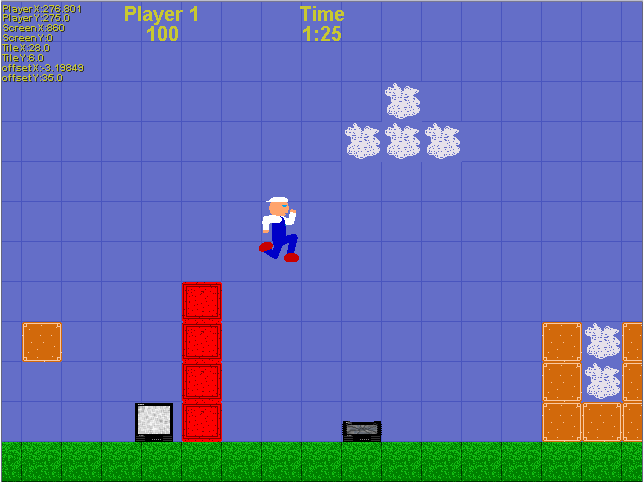
This page demonstrates a 2D platformer style game that has all of the features of the basic 2D platformer but has more features such as:
Jump ahead to see the final result...
See the basic version of 2D platformer...
Refer to the basic 2D platformer game for basic code elements. Here we will just show the additions made to the basic game.
Near the beginning of the program, add the SeedRnd command to randomize the badguys movements
;Seed the random number generator SeedRnd MilliSecs() ;Required to get random results
Also in the beginning, define the Type that will store each badguys information:
;Define Types ;Used to store character information Type BadGuyType ;Set up the badguy type Field ID ;Type of badguy (1=TV, 2=?, ...) Field X# ;X World position Field Y ;Y World position Field XVel# ;X velocity ;Field YVel# ;Y velocity Field State ;State that the badguy is in (0=crushed, 1=wander, 2=chase) End Type
Load up the media that the game will use. We have to create a few extra Globals to store the current animation frames. Notice that we have to provide a Mask color for the TV image. This is because it uses the color black in the image and so a different color was selected as the transparent color.
Global tileImages ;Stores handle to image of background tiles
Global imgPlayer ;Stores handle to players image
Global frmPlayer# = 1 ;Stores players current frame of animation
Global frmTV ;Stores TV's current frame of animation
;Load in all graphics, sounds, fonts, etc.
Global maxTile = 6 ;Define highest used tile for error catching
tileImages = LoadAnimImage("bgtiles.png", 40, 40, 0, 8) ;Background tiles
imgPlayer = LoadAnimImage("jumpmanstrip.png", 40, 80, 0, 11) ;Player anim frames
imgTV = LoadAnimImage("TVstrip.png", 40, 40, 0, 9) ;TV anim frames
MaskImage imgTV, 255, 0, 255 ;Set transparency color for TV image since image uses black
sndBreak = LoadSound("TVSmash.wav") ;Sound played when TV is smashed
fntArial=LoadFont("Arial",12,True,False,False) ;Font used for smaller print
fntArialBig=LoadFont("Arial",24,True,False,False) ;Font used for larger print
Create a couple more globals that you will need:
Global Score1 ;Players score Global LevelTime# = 120 ;Time required to finish level
Loading the level has a few enhancements. The function itself and all of the Data statements should be at the end of your program though.
LoadLevel(CurLevel, 1, 8) ;Load in the first level; Set players starting position
Function LoadLevel(lvl, startX, startY)
;Erase any leftover baddies from previous level
For thisbadguy.BadGuyType = Each BadGuyType ;Iterate through all of the badguys
Delete thisbadguy ;Delete the badguy
Next
;Select the level data to restore
Select lvl
Case 1
Restore Data_Level1 ;Set data pointer to level 1
Case 2
Restore Data_Level2 ;Set data pointer to level 2
Case 3
Restore Data_Level3 ;Set data pointer to level 3
Default
RuntimeError("Error: Level " + lvl + " doesn't exist!")
End Select
;Read in the level width and height
Read LevelWidth ;Width of level in tiles
Read LevelHeight ;Height of level in tiles
If LevelWidth > 999 Or LevelWidth < 1 Then RuntimeError("Error: Level " + lvl + " data is corrupt!")
If LevelHeight > 999 Or LevelHeight < 1 Then RuntimeError("Error: Level " + lvl + " data is corrupt!")
Dim Level(LevelWidth-1, LevelHeight-1) ;Dimension grid that describes the game level at this time
;Verify the players starting tile
If startX >= LevelWidth Or startX < 0 Then RuntimeError("Error: Level " + lvl + " data is corrupt!")
If startY >= LevelHeight Or startY < 1 Then RuntimeError("Error: Level " + lvl + " data is corrupt!")
;Compute initial starting positions
If startX < 5 ;If player is near left edge of level then
ScreenX = 0 ; set the screen all the way left and
PlayerX = startX * 40 + 20 ; set players x starting pos
ElseIf startX > LevelWidth - 12 ;If player is near right edge of level then
ScreenX = LevelWidth * 40 - 640 ; set the screen all the way right, minus screen width and
PlayerX = startX * 40 - ScreenX + 20 ; set players x starting pos minus screen pos
Else ;If player isn't near left/right edges of level then
ScreenX = startX * 40 - 200 ; set the screen 5 tiles to the left of player and
PlayerX = 220 ; set the players x starting position at 220
EndIf
If startY < 4 ;If player is near top edge of the level then
ScreenY = 0 ; set the screen at the top and
PlayerY = (startY + 1) * 40 ; set players y starting pos
ElseIf startY > LevelHeight - 9 ;If player is near the bottom edge of the level then
ScreenY = LevelHeight * 40 - 480 ; set the screen all the way down, minus screen height and
PlayerY = (startY + 1) * 40 - ScreenY ; set players y starting position minus screen pos
Else ;If player isn't near top/bottom edges of level then
ScreenY = (startY + 1) * 40 - 160 ; set the screen 4 tiles above the player and
PlayerY = 160 ; set the players y starting position at 160
EndIf
MaxScreenX = 40 * LevelWidth - 640 - 1 ;Set the screens maximum x position
MaxScreenY = 40 * LevelHeight - 480 ;Set the screens maximum y position
;Read in the screen clearing color
Read clscol ;Read in color that will be used to clear the screen
If clscol = 1
ClsColor 100, 110, 200 ;Set cls color to sky color
Else
ClsColor 0, 0, 0 ;Set cls color to black
EndIf
;Read in exit data
Read NumExits ;Read in number of exits in the level
If NumExits > 10 Or NumExits < 1 Then RuntimeError("Error: Level " + lvl + " data is corrupt!")
Dim LevelExit(NumExits, 4) ;Dimension LevelExit array at this time
For iter = 1 To NumExits ;Iterate through the exits
Read LevelExit(iter, 0) ;Read the exits x position
Read LevelExit(iter, 1) ;Read the exits y position
Read LevelExit(iter, 2) ;Read which level the exit links to
Read LevelExit(iter, 3) ;Read new x pos on new level
Read LevelExit(iter, 4) ;Read new y pos on new level
Next
;Read in level data
For yIter = 0 To LevelHeight-1 ;Loop from top to bottom
For xIter = 0 To LevelWidth-1 ;Loop from left to right
Read Level(xIter, yIter) ;Read in tile data for each xIter, yIter location
If Level(xIter, yIter) > maxTile ;Tile contains a bad guy as well
thisbadguy.BadGuyType = New BadGuyType ;create a new badguy
thisbadguy\ID = 1 ;1 badguy in this example - add more types by adding badguy ID to tile
thisbadguy\X = xIter * 40 ;Set badguys X coordinate
thisbadguy\Y = (yIter+1) * 40 ;Set badguys Y coordinate
thisbadguy\XVel = .5 - 1 * Rand(0, 1) ;Randomly set its velocity/direction
thisbadguy\State = 1 ;Set its initial state (1=wander)
Level(xIter, yIter) = Level(xIter, yIter) - 7 ;Subtract badguy ID from tile to determine tile type
EndIf ;Make sure tile is still within limits or else throw an error
If Level(xIter, yIter) > maxTile Or Level(xIter, yIter) < 0 Then RuntimeError("Error: Level " + lvl + " data is corrupt!")
Next
Next
;Reset some game variables
XVel = 0 ;Reset players velocitys or he'll still be moving
YVel = 0 ; when entering into the next level
End Function
Unfinished...
And here is the entire code pieced together so that you can copy&paste it
and immediately run it to see how it works.
Unfortunately, it doesn't all fit into one text box, so you'll have to add the code in the
2nd text box to the first.
|
|
| If you've reached this page and there's no index on the left, Click here to show the Index Page | |