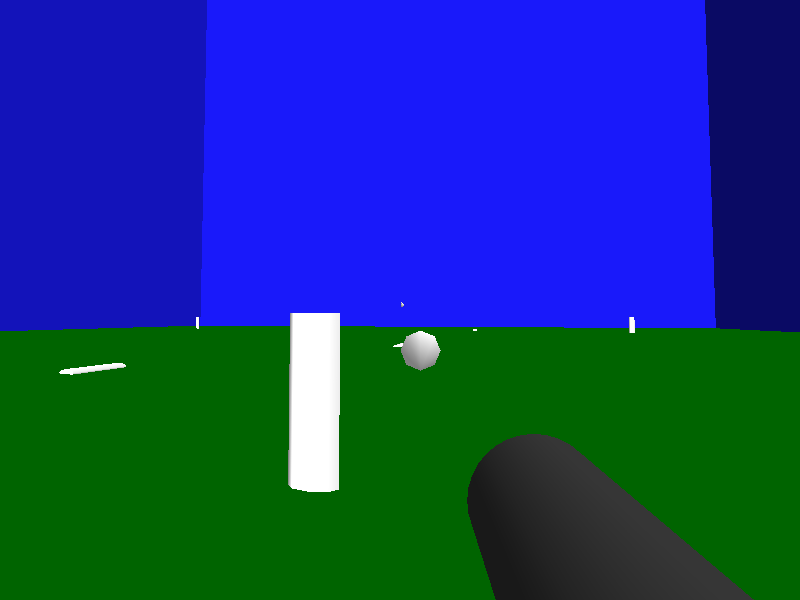
This page demonstrates some very basic (Blitz specific)
example code of a First Person Shooter (FPS) game:
Note that this example
is intentionally simplistic (in all respects) for the purpose of demonstrating the
absolute minimum code necessary to create a FPS type of game.
An updated and improved version of this example is currently being
written.
Some of its features will be:
-uses models for weapons and environment
-switches between two (or more) weapons
-player can zoom in with weapon
-weapons require reloading
-weapons have recoil
-demonstrates using sounds
-projectile trajectories are unique to each weapon
-uses a finite state machine for NPC AI
-uses a frame limiter to automatically adjust to real time
-player has ability to jump
Come back soon to see the improved version of this
example
Start with setting up 3D graphics:
Graphics3D 800, 600						;3D graphics at a resolution of 800x600
SetBuffer BackBuffer()						;do all drawing to the back drawing buffer
Type bullettype ;set up the bullet type
Field entityhandle ;create a field to contain the handle of the bullets mesh
End Type
Type badguytype ;set up the badguy type
Field entityhandle ;will contain the handle of the badguys mesh
Field state ;will contain the state that the badguy is currently in
End Type
Create and load in your 3d objects:
light = CreateLight() ;Create a light to see
RotateEntity light, 30, 30, 0 ;angle the light
player = CreatePivot() ;A simple pivot is all we need to represent the player
camera = CreateCamera(player) ;create the camera and attach it to the player
CameraRange camera, .01, 250 ;set the camera range to something reasonable
;level = LoadMesh("level.b3d") ;load in the level mesh
level = CreateCube():ScaleEntity level,50,50,50:FlipMesh level:MoveEntity level,0,50,0:EntityColor level,20,20,200
levelfloor=CreatePlane():MoveEntity levelfloor,0,.002,0:EntityColor levelfloor,0,100,0 ;plane not needed, added it just for color
;weapon1 = LoadMesh("pistol.b3d", camera) ;load in the weapon mesh and attach it to the camera
weapon1 = CreateCylinder(32, 1, camera):RotateMesh weapon1, 90, 0, 0:ScaleEntity weapon1, .05, .05, .2:EntityColor weapon1, 50, 50, 50
;bulletmesh = LoadMesh("bullet.b3d") ;load in a bullet mesh (this will be a template mesh)
bulletmesh = CreateCone():RotateMesh bulletmesh,90,0,0:ScaleEntity bulletmesh,.1,.1,.1
EntityType bulletmesh, BULLET_COL ;set up collision type for the bullet
EntityRadius bulletmesh, .01 ;set up collision radius for the bullet
;badguymesh = LoadMesh("badguy.b3d") ;load in badguy mesh (this will also be a template mesh)
badguymesh = CreateCylinder():ScaleEntity badguymesh,.3,.95,.125;.6 wide, 1.9 tall, .25 thick
EntityType badguymesh, ENEMY_COL ;set up collision type for the badguy
EntityRadius badguymesh, .3, .95 ;set up collision radius for the badguy (1.9 meters tall, .6 meters wide)
HideEntity bulletmesh ;hide the template meshes since they are not actual objects
HideEntity badguymesh ;this will also exclude them from collisions
etc...
Create your beginning objects:
For iter = 1 To 10 ;create some badguys from the template badguy mesh
badguy.badguytype = New badguytype ;create a new badguy
badguy\entityhandle = CopyEntity(badguymesh) ;give him a mesh
badguy\state = Rnd(1, 2) ;1=Guard 2=Search 3=Evade 4=Attack 5=Dead
Next
Arrange your objects:
MoveEntity camera, 0, .9, 0 ;move camera up to height of players head (also moves weapon)
MoveEntity weapon1, .1, -.15, .1 ;move weapon to bottom right of camera
MoveEntity player, 20, 1, -20 ;move the player to the starting position
For badguy = Each badguytype ;iterate through all of the badguys
PositionEntity badguy\entityhandle, Rnd(100)-50, .95, Rnd(100)-50 ;move the badguy to a random starting position
Next
etc...
Set up collisions between all of the objects:
EntityType player, PLAYER_COL ;set up collision type for the player
EntityRadius player, .3, .95 ;set up the players collision radius (1.9 meters tall, .6 meters wide)
EntityType level, LEVEL_COL ;set up collision type for the level
Collisions PLAYER_COL, LEVEL_COL, 2, 2 ;player to level
Collisions PLAYER_COL, ENEMY_COL, 1, 2 ;player to badguy
Collisions ENEMY_COL, LEVEL_COL, 2, 2 ;badguy to level
Collisions BULLET_COL, LEVEL_COL, 2, 1 ;bullet to level
Collisions BULLET_COL, ENEMY_COL, 2, 1 ;bullet to badguy
Then add a loop that updates the screen every frame.:
While Not Keyhit(1) ;ESC key
;insert additional code here
UpdateWorld ;figures out collisions
RenderWorld ;draws the 3d scene
Flip ;displays the scene to the screen
Wend ;loop until the ESC key is pressed
Add lines Inside of your loop (before UpdateWorld) that
collect the players input and handle how to move the player:
wkey = KeyDown(17) ;collect user input
skey = KeyDown(31) ;It's a good practice to collect these inputs only once
akey = KeyDown(30) ;per loop. This will prevent odd behaviors from happening,
dkey = KeyDown(32) ;for instance if the state of a key changes between multiple
mouse1 = MouseHit(1) ;checks of that key while still in the same loop.
If wkey Then MoveEntity player, 0, 0, .1 ;Forward - w key
If skey Then MoveEntity player, 0, 0, -.1 ;Back - s key
If akey Then MoveEntity player, -.1, 0, 0 ;Left - a key
If dkey Then MoveEntity player, .1, 0, 0 ;Right - d key
Next, add lines that handle how to allow the player (and camera) to look around:
TurnEntity player, 0, -MouseXSpeed()/5.0, 0 ;rotate player Pivot according to mouse X movement
TurnEntity camera, MouseYSpeed()/5.0, 0, 0 ;rotate camera up/down according to mouse Y movement
If EntityPitch(camera) < -45 ;don't allow camera to look below -45 degrees
RotateEntity camera, -45, EntityYaw(camera), EntityRoll(camera)
EndIf
If EntityPitch(camera) > 45 ;don't allow camera to look above 45 degrees
RotateEntity camera, 45, EntityYaw(camera), EntityRoll(camera)
EndIf
MoveMouse GraphicsWidth()/2, GraphicsHeight()/2 ;reset mouse position to middle of screen
Add some simple gravity:
TranslateEntity player, 0, -.1, 0 ;simple gravity
Add code to allow the player to shoot:
If mouse1 ;check if left mouse button was pressed
bullet.bullettype = New bullettype ;create a bullet
bullet\entityhandle = CopyEntity(bulletmesh) ;create the bullet mesh
PositionEntity bullet\entityhandle, EntityX(weapon1, 1), EntityY(weapon1, 1), EntityZ(weapon1, 1) ;place the bullet at the guns position
RotateEntity bullet\entityhandle, EntityPitch(weapon1, 1), EntityYaw(weapon1, 1), EntityRoll(weapon1, 1);orientate the bullet with the gun
ResetEntity bullet\entityhandle ;otherwise bullet could hit enemy while moving from 0,0,0 to current position
EndIf
Add code to move the bullets every frame:
For thisbullet.bullettype = Each bullettype ;iterate through all of the bullets
MoveEntity thisbullet\entityhandle, 0, 0, 2 ;move the bullet forward along the bullets Z axis
If Abs(EntityX(thisbullet\entityhandle, 1)) > 10000 ;check if the bullet is way out of bounds
FreeEntity thisbullet\entityhandle ;delete the bullet mesh
Delete thisbullet ;delete the bullet
ElseIf Abs(EntityY(thisbullet\entityhandle, 1)) > 10000 ;check if the bullet is way out of bounds
FreeEntity thisbullet\entityhandle ;delete the bullet mesh
Delete thisbullet ;delete the bullet
ElseIf Abs(EntityZ(thisbullet\entityhandle, 1)) > 10000 ;check if the bullet is way out of bounds
FreeEntity thisbullet\entityhandle ;delete the bullet mesh
Delete thisbullet ;delete the bullet
EndIf
Next
Add code between UpdateWorld and RenderWorld
to check if any collisions occured between the bullets and anything else. Kill a badguy if
the bullet hit one.
For thisbullet = Each bullettype ;iterate through all of the bullets
If CountCollisions(thisbullet\entityhandle) > 0 ;check if bullet collided with something
enemyhit = EntityCollided(thisbullet\entityhandle, 3) ;note which enemy (entity type 3) bullet collided with (if any)
If enemyhit > 0 Then KillBadGuy(enemyhit) ;enemyhit contains entity handle of enemy that was hit
FreeEntity thisbullet\entityhandle ;delete the bullet mesh
Delete thisbullet ;delete the bullet
EndIf
Next
And finally add this function after the end of the program to kill a badguy if he was
struck with a bullet.
Function KillBadGuy(enemyhit)
For thisbadguy.badguytype = Each badguytype ;iterate through all of the badguys
If enemyhit = thisbadguy\entityhandle ;check if the enemy hit = this badguy
If thisbadguy\state <> 5 ;check if badguy is alive
thisbadguy\state = 5 ;dead ;make him dead
EntityType thisbadguy\entityhandle, 0 ;turn off collisions for this badguy
RotateEntity thisbadguy\entityhandle, 90, 0, 0 ;make him horizontal
TranslateEntity thisbadguy\entityhandle, 0, -.9, 0 ;set him on the ground
Exit ;exits the badguy For-Next loop (no need to check rest of badguys)
EndIf
EndIf
Next
End Function
And here is the entire code pieced together and using temporary objects as
placeholders so that you can immediately run it to see how it works.
Keys used in this example:
A key Move left
D key Move right
W key Move forward
S key Move backward
Mouse Looks left/right/up/down
Leftmousebutton Fires weapon
Esc key Exits program
Graphics3D 800, 600, 0, 1 ;3D graphics at a resolution of 800x600
SetBuffer BackBuffer() ;do all drawing to the back drawing buffer
Const PLAYER_COL= 1
Const LEVEL_COL = 2
Const ENEMY_COL = 3
Const BULLET_COL= 4
Type bullettype							;set up the bullet type
  Field entityhandle						;create a field to contain the handle of the bullets mesh
End Type

Type badguytype							;set up the badguy type
  Field entityhandle						;will contain the handle of the badguys mesh
  Field state							;will contain the state that the badguy is currently in
End Type
light = CreateLight() ;Create a light to see
RotateEntity light, 30, 30, 0 ;angle the light
player = CreatePivot() ;A simple pivot is all we need to represent the player
camera = CreateCamera(player) ;create the camera and attach it to the player
CameraRange camera, .01, 250 ;set the camera range to something reasonable
;level = LoadMesh("level.b3d") ;load in the level mesh
level = CreateCube():ScaleEntity level,50,50,50:FlipMesh level:MoveEntity level,0,50,0:EntityColor level,20,20,200
levelfloor=CreatePlane():MoveEntity levelfloor,0,.002,0:EntityColor levelfloor,0,100,0 ;plane not needed, added it just for color
;weapon1 = LoadMesh("pistol.b3d", camera) ;load in the weapon mesh and attach it to the camera
weapon1 = CreateCylinder(32, 1, camera):RotateMesh weapon1, 90, 0, 0:ScaleEntity weapon1, .05, .05, .2:EntityColor weapon1, 50, 50, 50
;bulletmesh = LoadMesh("bullet.b3d") ;load in a bullet mesh (this will be a template mesh)
bulletmesh = CreateCone():RotateMesh bulletmesh,90,0,0:ScaleEntity bulletmesh,.1,.1,.1
EntityType bulletmesh, BULLET_COL ;set up collision type for the bullet
EntityRadius bulletmesh, .01 ;set up collision radius for the bullet
;badguymesh = LoadMesh("badguy.b3d") ;load in badguy mesh (this will also be a template mesh)
badguymesh = CreateCylinder():ScaleEntity badguymesh,.3,.95,.125;.6 wide, 1.9 tall, .25 thick
EntityType badguymesh, ENEMY_COL ;set up collision type for the badguy
EntityRadius badguymesh, .3, .95 ;set up collision radius for the badguy (1.9 meters tall, .6 meters wide)
HideEntity bulletmesh ;hide the template meshes since they are not actual objects
HideEntity badguymesh ;this will also exclude them from collisions
For iter = 1 To 10						;create some badguys from the template badguy mesh
  badguy.badguytype = New badguytype				;create a new badguy
  badguy\entityhandle = CopyEntity(badguymesh)			;give him a mesh
  badguy\state = Rnd(1, 2) 					;1=Guard 2=Search 3=Evade 4=Attack 5=Dead
Next
MoveEntity camera, 0, .9, 0 ;move camera up to height of players head (also moves weapon)
MoveEntity weapon1, .1, -.15, .1 ;move weapon to bottom right of camera
MoveEntity player, 20, 1, -20 ;move the player to the starting position
For badguy = Each badguytype ;iterate through all of the badguys
PositionEntity badguy\entityhandle, Rnd(100)-50, .95, Rnd(100)-50 ;move the badguy to a random starting position
Next
EntityType player, PLAYER_COL					;set up collision type for the player
EntityRadius player, .3, .95					;set up the players collision radius (1.9 meters tall, .6 meters wide)
EntityType level, LEVEL_COL					;set up collision type for the level
Collisions PLAYER_COL, LEVEL_COL, 2, 2				;player to level
Collisions PLAYER_COL, ENEMY_COL, 1, 2				;player to badguy
Collisions ENEMY_COL, LEVEL_COL, 2, 2				;badguy to level
Collisions BULLET_COL, LEVEL_COL, 2, 1				;bullet to level
Collisions BULLET_COL, ENEMY_COL, 2, 1				;bullet to badguy
While Not KeyHit(1) ;ESC key
wkey = KeyDown(17)						;collect user input
skey = KeyDown(31)						;It's a good practice to collect these inputs only once
akey = KeyDown(30)						;per loop.  This will prevent odd behaviors from happening,
dkey = KeyDown(32)						;for instance if the state of a key changes between multiple
mouse1 = MouseHit(1)						;checks of that key while still in the same loop.

If wkey Then MoveEntity player, 0, 0, .1			;Forward - w key
If skey Then MoveEntity player, 0, 0, -.1			;Back    - s key
If akey Then MoveEntity player, -.1, 0, 0			;Left    - a key
If dkey Then MoveEntity player, .1, 0, 0			;Right   - d key
TurnEntity player, 0, -MouseXSpeed()/5.0, 0			;rotate player Pivot according to mouse X movement
TurnEntity camera, MouseYSpeed()/5.0, 0, 0			;rotate camera up/down according to mouse Y movement
If EntityPitch(camera) < -45					;don't allow camera to look below -45 degrees
  RotateEntity camera, -45, EntityYaw(camera), EntityRoll(camera)
EndIf
If EntityPitch(camera) > 45					;don't allow camera to look above 45 degrees
  RotateEntity camera, 45, EntityYaw(camera), EntityRoll(camera)
EndIf
MoveMouse GraphicsWidth()/2, GraphicsHeight()/2			;reset mouse position to middle of screen
TranslateEntity player, 0, -.1, 0 ;simple gravity
If mouse1							;check if left mouse button was pressed
  bullet.bullettype = New bullettype				;create a bullet
  bullet\entityhandle = CopyEntity(bulletmesh)			;create the bullet mesh
  PositionEntity bullet\entityhandle, EntityX(weapon1, 1), EntityY(weapon1, 1), EntityZ(weapon1, 1)	;place the bullet at the guns position
  RotateEntity bullet\entityhandle, EntityPitch(weapon1, 1), EntityYaw(weapon1, 1), EntityRoll(weapon1, 1);orientate the bullet with the gun
  ResetEntity bullet\entityhandle				;otherwise bullet could hit enemy while moving from 0,0,0 to current position
EndIf
For thisbullet.bullettype = Each bullettype			;iterate through all of the bullets
  MoveEntity thisbullet\entityhandle, 0, 0, 2			;move the bullet forward along the bullets Z axis
  If Abs(EntityX(thisbullet\entityhandle, 1)) > 10000		;check if the bullet is way out of bounds
    FreeEntity thisbullet\entityhandle				;delete the bullet mesh
    Delete thisbullet						;delete the bullet
  ElseIf Abs(EntityY(thisbullet\entityhandle, 1)) > 10000	;check if the bullet is way out of bounds
    FreeEntity thisbullet\entityhandle				;delete the bullet mesh
    Delete thisbullet						;delete the bullet
  ElseIf Abs(EntityZ(thisbullet\entityhandle, 1)) > 10000	;check if the bullet is way out of bounds
    FreeEntity thisbullet\entityhandle				;delete the bullet mesh
    Delete thisbullet						;delete the bullet
  EndIf
Next
UpdateWorld ;figures out collisions
For thisbullet = Each bullettype ;iterate through all of the bullets
If CountCollisions(thisbullet\entityhandle) > 0 ;check if bullet collided with something
enemyhit = EntityCollided(thisbullet\entityhandle, 3) ;note which enemy bullet collided with (if any)
If enemyhit > 0 Then KillBadGuy(enemyhit) ;enemyhit contains entity handle of enemy that was hit
FreeEntity thisbullet\entityhandle ;delete the bullet mesh
Delete thisbullet ;delete the bullet
EndIf
Next
RenderWorld ;draws the 3d scene
Flip ;displays the scene to the screen
Wend ;loop until the ESC key is pressed
End
Function KillBadGuy(enemyhit)
  For thisbadguy.badguytype = Each badguytype			;iterate through all of the badguys
    If enemyhit = thisbadguy\entityhandle			;check if the enemy hit = this badguy
      If thisbadguy\state <> 5					;check if badguy is alive
        thisbadguy\state = 5 ;dead				;make him dead
        EntityType thisbadguy\entityhandle, 0			;turn off collisions for this badguy
        RotateEntity thisbadguy\entityhandle, 90, 0, 0		;make him horizontal
        TranslateEntity thisbadguy\entityhandle, 0, -.9, 0	;set him on the ground
        Exit							;exits the badguy For-Next loop (no need to check rest of badguys)
      EndIf
    EndIf
  Next
End Function